Drillholes
This
 Compositing
Add to Drillhole Database
An Add output to the drillhole database check box option has been added to the following Compositing tools:
-
Bench
-
Downhole
-
Geology
-
Grade, and
-
Interval
In many cases, it may be useful to store the results of the compositing process to the database that the input interval or assay file is associated with. This aids in visualisation, making it easier to display related downhole data in Vizex.
When creating DHDB some errors detect will cause a hard stop to the creation and the DHDB will be empty. For the error "Surveys go beyond collar file total depth." make it behave more like a warning and allow the DHDB to be created. All warnings and errors should be written to the console.
Database
Sort by Hole and Depth
A Sort option has been added to the Manage tool on the Drillhole tab, in the Database group. This new option allows you to sort Collar, Survey, Event and Interval files associated with a Drillhole Database by Hole ID and From/Depth.
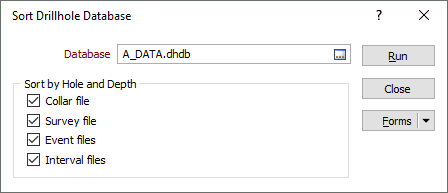
In addition, a Sort by Hole and Depth check box has been added:
-
to the Output Database tab of the Create Drillhole Database form to configure the sort behaviour for a new drillhole database.
-
to the Refresh Database options on the Drillhole ribbon in the Database group.